Showing posts with label chipboard. Show all posts

Saturday, October 14, 2023

Cocoa Vanilla Studio - More Happy Days

Here to share some more Cocoa Vanilla Studio, Happy Days goodies from the Scrap Shotz shop and how they are shaping up into summer loving layouts from my scrappy space! 

For a peek at my first few pages with this amazing collection, pop over to Cocoa Vanilla Studio - Happy Days. Now let’s get to my newest layouts … 

Embrace The Alphas


For this layout, I reached for the Cocoa Vanilla Studio - Happy Days, Chipboard Title Stickers. I love the doodled look of the alphas and wanted to use as many as I could on a layout - so decided to use them as my background! 

I prepped this pattern paper from the collection with some black splatters. I also added a few random texture stamps and phrase stamps from my stash around the edges using Paper Rose Studio, Premium Dye Ink - Intense Black. This creates a sort of frame for the layout and love how it draws the eye to the middle of the page. I then used Ranger Ink, Distress Ink in Black Soot and one of my way-too-many stencils from Vicki Boutin and shaded in some colour in the middle of the page to anchor the alphas and my photos. I added a few small touches of the stencil to the edges of the page too. 


From there, I picked my favorite titles and spelt those out across the middle of the page - using a ruler to make sure they stayed straight. I wasn’t worried about covering up some the titles with my photos, that’s part of the fun. I did put the titles a little off set though and added the heart chipboards in between for a touch of colour. 

I then added two small photos, with a few collection patterns layers behind, and then just tucked and layered the florals from the Cocoa Vanilla, Happy Days - Floral Ephemera in and around the photos. My final touch was a couple little tucked tags with black/white twine and the collection die cut butterflies. 

All The Pattern Paper 


For my next magic trick (ha ha), I reached for every single pattern in the collection - they are all so pretty! 

First, I had to create my background. I cut down a 12x12 piece of cardstock to 11.75x11.75 and backed it with the cut apart pattern paper. I like how the cut apart has so many different colours and patterns making the edge of a layout a lot of fun. I used Ranger Ink, Distress Ink in Black Soot and a paw print from Peartree Cutfiles to add some paws to the background, and matched some Distress Inks to the Happy Days collection to add some small splatters around the paws. 

Now let’s get to the pattern paper! First I cut 3 pattern pieces in about 6.5 wide and 9.5 high; used a white journal pen to quickly and messily outline the edge then layered and titled them so just edges of each were peeking out and dropped those in the middle of the page. I reached for my 4 photos and added a layer or two of pattern behind each - also tilted and outlined in a white journal pen. I dropped those down on the larger pattern a little messy too but generally in a grid pattern. No straight lines on my layouts. 


For the final touch, I cut a few thin circles from the pattern paper and tucked them behind the top right and left bottom corner photos. I used the circle to anchor my title from the chipboard alphas and tucked in a few of the florals too. I used the same white journal pen to add some white lines to the leaves of the floral bunches. 

I had such fun with this Cocoa Vanilla collection - definitely one to add to your shopping cart for those summer, hot vacation or everyday playful photos! 


Wednesday, March 3, 2021

Take a Hike, Inspired by a Shape


Another fun collection Scrap Shotz sent me to play with is the ‘Take A Hike’ collection from Reminisce. I have never had the pleasure of playing with one of the Reminisce collections and I have been missing out - such fun! 

One of the bits of a collection or kit I generally check out first are the die cuts - my favourite! While the Reminisce collections don’t seem to come with die cuts they sure come with some fantastic stickers on a 12x12 sheet (which I popped onto some white cardstock and fussy cut to make die cuts) and cut apart pocket cards (which I fussy cut the images from). A couple of episodes of Departures and some fussy cutting scissors and I now have Take a Hike die cuts. Perfect! 

Circles ... 

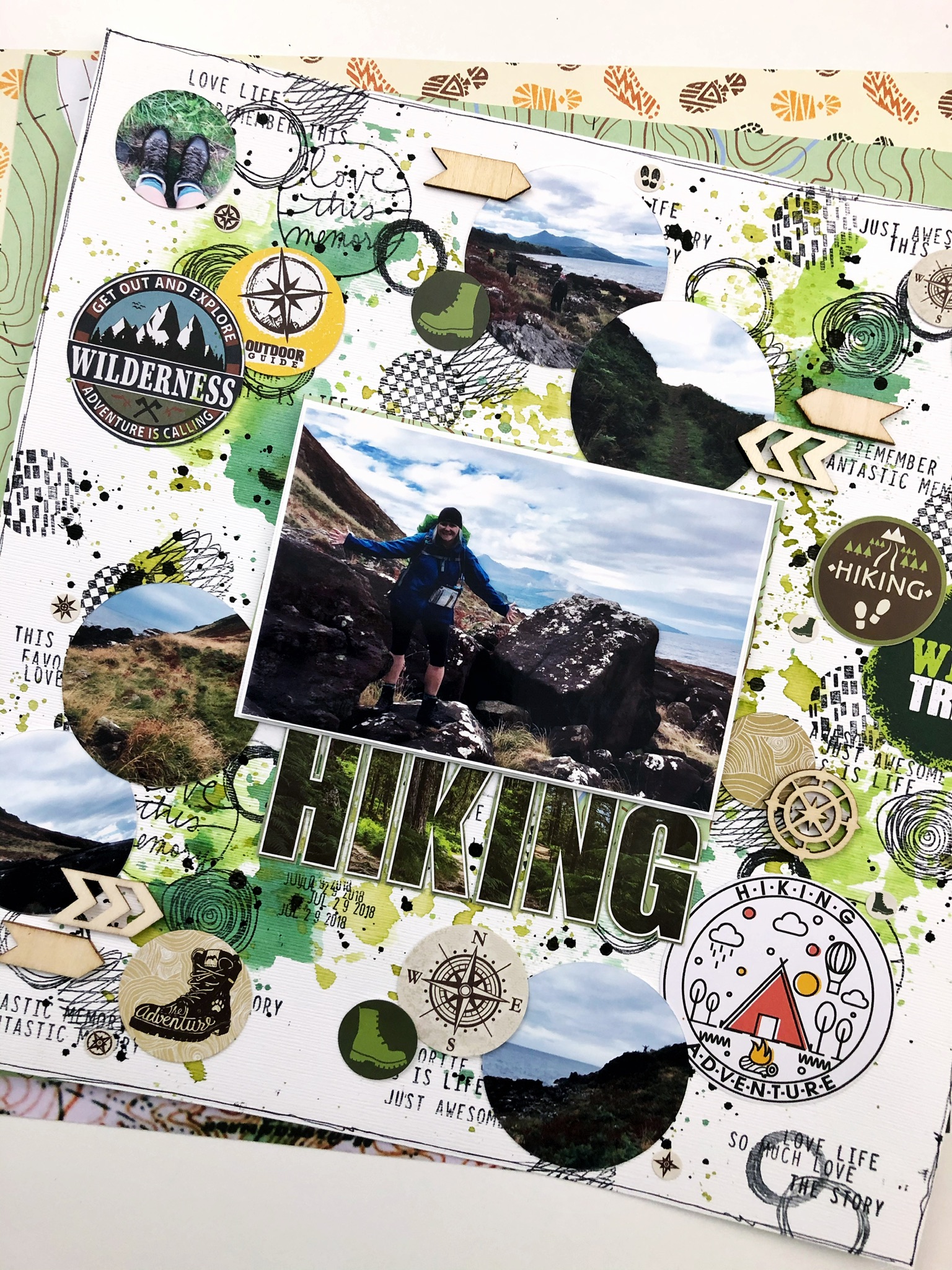
For my first layout I was inspired by all the fantastic circles in the collection - mostly from the sticker sheet but some are fussy cut too. Using the Take a Hike circles and some circle stamps in my stash, I created a messy circle infused pattern -working to cover the full background. I stamped some word phrases in and around the clusters of circles and added done green paint to give it even more mess. 

When I went to add my photos to the layout it made sense to continue the circle theme for at least some of them. So those that were far away pics of our crew hiking, looking down at my boots, or a landscape shot I made them circles and added them into the background pattern. 


I topped off the layout with a 4x6 feature picture of myself - this is my happy place. Fresh air, hiking boots on, tech gear, good weather and a trail and friends around me. 

For the title  I used ‘Hiking’ (nothing like stating the obvious eh!) which I fussy cut from on of the large stickers in the kit. I love how bold the title is, even with so much going on in the background. 

To finish it off, I added some black splatters and a few wood veneer bits from my stash. 

Chevrons... 

For my next page, I started by with chevrons. A couple of the stickers had some great patterns - a brown/tan compass pattern, and a French topographic map. You had me at map and compass! I popped these onto cardstock and then using a chevron stamp from my stash I punched as many as I could for my background. More die cuts! 

Keeping most of my design to the right of the page, I set up the chevrons to look like short stripes out both sides of this 4x6 portrait oriented photo. I liked this stripe idea so I kept building on that with the stickers and fussy cut pieces I made into die cuts from the collection. 

From there it was just a lot of fun tucking some patterns here and there, adding a few tree stamps where I had a gap in the chevrons and of course some splatters. This is a hiking photo after all - a little mess is expected. 

For my title I couldn’t resist grabbing the Kaisercraft Chipboard Alphas in the shop that I have been loving playing with. So fun! I covered each with a green/blue Bazzil Cardstock scrap from my stash (most than likely from a past Scrap Shotz kit!) and stamped them each a few times with that tree stamp for a slight pattern. I did the same for a few arrows from the chipboards too and placed those at the top and bottom of my layer of strips around the photo. 


For the finishing touch I messy cut a little bit of each side of the white cardstock away, roughed up the edges with my distress tool and placed the whole thing down on a Mysterious Teal, Bazzil Cardstock. I love how this gives the whole thing a bit of a frame - really drawing the eye to the center. 

I still have loads to play with in the Take a Hike collection and see a grid layout in its future ... 

Thanks for stopping by! 


Thursday, February 25, 2021

Kaisercraft Chipboard Alphas


Have you got your hands on the Kaisercraft Chipboard Alphas yet? Oh my wow, I am having so much fun customizing these to match my layouts! 

Sharing the four layouts I have had the pleasure of creating so far using these chipboards and the Kaisercraft Explorer collection. Hope to inspire you to give them a try! 

Pattern Paper and Stamps: 

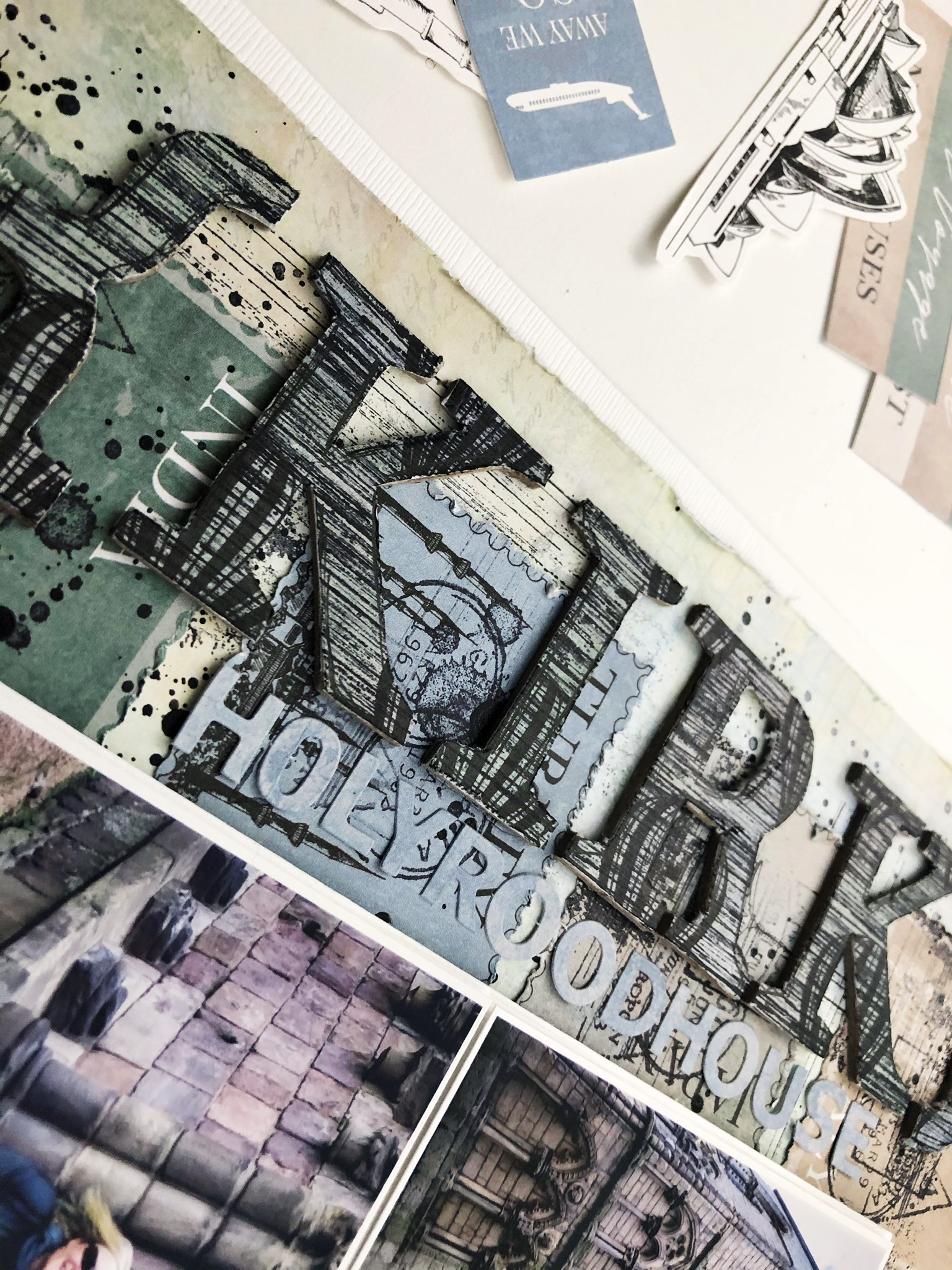
For this layout I customized the chipboard alphas in the word ‘Kirk’ to match using both pattern paper and stamps: 

1) covered each letter with the blue air balloon pattern paper of the collection (Flight) using liquid glue

2) flipped them on their face once the glue had dried and cut around each letter with a craft knife. The chipboard gives the pen a place to push up against making this quick work

3) stamped the front of each letter over and over again with this grungy stripe stamp from my stash in Staz On Jet Black

4) using a black journalling pen I messily traced the outline of each letter on the edge of the pattern paper 

Stamps and Watercolour Paint: 

For my title ‘ROAM’ I used a stamp and some watercolour paints:

1) using the suitcase stamp from the Wild Whisper Designs, Where to Next? set and some Staz On Jet Black to just stamp over and over on the front of each alpha

2) scribbled some Vicki Boutin Art Crayon in blue/grey onto plastic, added some water and after mixing it up with a paint brush used it to paint each letter 

Strips of Pattern Paper and Border Stickers:

For this title ‘Wallace’ I focused on the pattern paper and stickers of the Explorer collection:  

1) cut thin 1/4 inch strips from my favourite patterns from the papers, branding strips and some of the border stickers from the collection 

2) covered each letter with adhesive glue 

3) messily laid down the strips of paper and border stickers in no particular order on each letter 

4) once the glue dried, I flipped the letters over and used a craft knife to cut around each letter to get rid of the excess bits of paper and sticker bits 

Some of my letters got a few random black splatters when I added those to the page - a fun touch! 

Stamps and Splatters: 


For this layout I used the chevron bits and pieces of the chipboard set:

1) stamped a bunch of travel inspired stamps from my stash in a messy way all over the front of each chevron using Staz On Jet Black 

2) scribbled some Vicki Boutin Art Crayon in blue/grey onto plastic, added some water and after mixing it up with a paint brush used the paint brush to splatter the letters 

3) squeezed some Nuvo Crystal Dots Black onto plastic, added a spritz or two of water, then used a paint brush to splatter the letters 

So many possibilities for making these chipboards perfect for your next layout. I should mention I didn’t prepare the letters in anyway with Gesso or anything. Also the chipboard set includes punctuation, arrows and as shown above chevrons too. 

Thanks for stopping by! 


Wednesday, December 18, 2019

Create Anchors for Embellishments

Are you addicted to embellishments as much as I am? There are so many amazing embellishments in the November Scrapbook Kit and I simply want to use them all - die cuts, stickers, chipboard, enamel dots, paper bow clips and more.

My desire to use way too many embellishments on my layouts has made it necessary to create some go-to page designs in my scrapbook repertoire that allow me to do just that - use way too many embellishments. These page designs focus on creating "anchors". A place where an embellishment can naturally be nestled or layered - not just floating in background paper space. 


One of the page designs I use often is this layered circle look. So simple! I cut a variety of sized circles (just the outline in this case but the full circle works too) of matching patterned papers (usually from scraps) and layer the circles down or across or diagonally on the page. For this layout, I layered the circles down the right-hand side and used one large circle on the left to sort-of frame my main 4x6 photo and give the layout some balance. You could also create a pattern of circles on the entire background - this is especially fun for bathtime photos, sort of like bubbles!

Once your circles are down, add you photos - I like to use a little foam to pop the photos up a little so they do not get lost in what will be embellishment organized chaos - and then start embellishing! Just make sure some edge of the embellishment is touching or "anchored" on one of the circles. Don't stop embellishing until you think you have way too many ... add a few more, then stop. 


You will notice I kept the background paper pretty plain on this layout - I knew I would have lots going on with the way too many embellishments and the circles so chose one of the Simple Stories, Winter Farmhouse coordinating dot papers from the kit as the background. I love how the simple and faint dots of the background paper also add another circle element.  

Don't have a circle cutter? Do not fret. This "anchor" concept can be created with squares of pattern paper, strips of paper (try washi or the banding strip), or stamp some words or phrases. I also love hand-drawn circles for this concept! Simply grab a few different sized cups, put them mouth down and trace with a black journaling pen - trace each a few times and make one of the lines a little less perfect than the others to give it a little something-something. 

Thanks for stopping by - I hope you are having a great December!