This is stunning!!!
Showing posts with label blog giveaway.. Show all posts
Showing posts with label blog giveaway.. Show all posts
Monday, November 21, 2011
November Blog Giveaway Winner!!!!!


Thursday, November 10, 2011
November Blog Contest
So don't you think it is time for another giveaway? Well, I do!
Here are the details!!! For tomorrow's post, leave a comment. Yup! That is it! I'll take comments until Monday November 14, 2011 noon MST and then draw for a winner.
Oh did I mention Sandy is giving away Tim Holtz notepad...yes, sweet!
So what are you waiting for?
Here are the details!!! For tomorrow's post, leave a comment. Yup! That is it! I'll take comments until Monday November 14, 2011 noon MST and then draw for a winner.
Oh did I mention Sandy is giving away Tim Holtz notepad...yes, sweet!
So what are you waiting for?
Tuesday, June 21, 2011
Summer Winners and a Contest!
Thank you everyone for the awesome comments! Using the handy dandy random number generator, the winners are... *drumroll please*
 KariLynn said...
Fabiola said...
 KariLynn said...
I love the relaxing pace of summer and having my kids at home all day and just having fun together...
and
Fabiola said...What I love love love about summer... long days filled with sunshine, t-shirts and shorts, and the sound of the ice-cream truck driving past my house.
KariLynn and Fabiola - please contact Sandy directly to claim your sweet prizes!
Congratulations! I look forward to seeing your creations!
Friday, November 20, 2009
Fabulous Friday - Inspiration Challenge
This week's Fabulous Friday challenge is from the lovely Wendy. Read on to find out more...
When I was at my mom’s this past weekend, she gave me this pamphlet. We didn’t get there, but I loved the colours!!!

My inspiration challenge is to create a layout or a card using the pamphlet as your inspiration.
I recently took a class with Krista Schneider who got me playing with my watercolour markers, again. I still love my Copics, but it is fun to try different mediums.

Can’t wait to see what you create!!!
Don't forget to link us up with your project for a chance to win this fabulous blog prize.

Friday, November 6, 2009
It's Fabulous Friday with Denise!
Hello Fellow Scrappers and welcome to my very first Blueprint Challenge! Not only is this the first time I've taken on this Scrap Shotz Blog Challenge but this also marks my debut as a "blueprint maker." Not true...I took that "oh so useful and practical in real life" drafting course in high school and have actually made real blueprints.
But back to scrapping...Sure I've used paper and pencil to sketch out quick ideas for layouts but had never tried to enter the electronic age of sketches. So I braced myself for the overload and dove in. Thanks to a few basics I actually remembered from Kathy T's PhotoShop classes I felt armed and dangerous and went in determined to win the battle.
And you know what? It was relatively easy!
Open up a new document in your version of PSE (I have version 6) and size appropriately for the finished layout. I chose 12 in x 12 in.
Choose a resolution 72 dpi and a background of white.
Use the rectangular marquee tool to draw in your photos, pattern papers and other layout items.
Use the Paint Bucket tool to select different colours for each element.
I used the Text tool to add Titles and journaling areas and the Shape tool to add an accent. You can also use the Brush tool although I'm not sure why they don't call this the Stamp tool, but then again that would make too much sense! LOL The trick here is to create a new layer each time you add a new element.
Over on the right of the screen, each new layer will be shown. You can change the order of these layers so that you can move an element "on top of" or "underneath" another element. You can also Left-Click on an element and there are options to "Move It Forward or Backwards" - who knew it could be this easy???
Note - This Blueprint contains no circles or curves of any kind. We'll talk about that in another tutorial - stay tuned!!!
Finally I saved my file as a .jpg.
So without further adieu, here is my Blueprint -
But back to scrapping...Sure I've used paper and pencil to sketch out quick ideas for layouts but had never tried to enter the electronic age of sketches. So I braced myself for the overload and dove in. Thanks to a few basics I actually remembered from Kathy T's PhotoShop classes I felt armed and dangerous and went in determined to win the battle.
And you know what? It was relatively easy!
Open up a new document in your version of PSE (I have version 6) and size appropriately for the finished layout. I chose 12 in x 12 in.
Choose a resolution 72 dpi and a background of white.
Use the rectangular marquee tool to draw in your photos, pattern papers and other layout items.
Use the Paint Bucket tool to select different colours for each element.
I used the Text tool to add Titles and journaling areas and the Shape tool to add an accent. You can also use the Brush tool although I'm not sure why they don't call this the Stamp tool, but then again that would make too much sense! LOL The trick here is to create a new layer each time you add a new element.
Over on the right of the screen, each new layer will be shown. You can change the order of these layers so that you can move an element "on top of" or "underneath" another element. You can also Left-Click on an element and there are options to "Move It Forward or Backwards" - who knew it could be this easy???
Note - This Blueprint contains no circles or curves of any kind. We'll talk about that in another tutorial - stay tuned!!!
Finally I saved my file as a .jpg.
So without further adieu, here is my Blueprint -

And here is my completed layout -

So now I challenge you to build a layout using my blueprint. Use it as is, flip it, turn it or whatever tickles your fancy! Can't wait to see what you come up with. And while you are at it, I also challeng eyou to try your hand at building a sketch blueprint. If I can do, so can you!
(And don't forget to link your layout and/or sketch in the comments section for extra ballots in the weekly blog giveaway!)
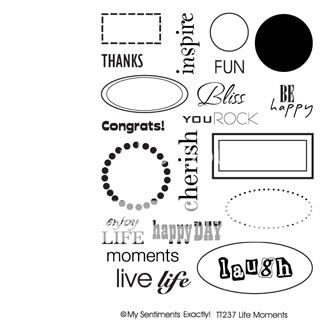
To end off this week, let me tease you with this week's blog giveaway...and awesome stamp set! The images are below! Yum!!!
Subscribe to:
Posts (Atom)